
There’s a new season upon us in the US and all across the world. The season of pandemic mitigation, safety, and concern for our fellow citizens. It’s a turbulent time, an uncertain time, and there is a definite new awareness of taking our own health into our own hands. One of the questions people are asking is how to check vitals at home. Most of us have been through the doctor’s office routines. You step on the weight scale, they take your blood pressure and your temperature. There are several regular check-in measurements taken before you see the doctor for the reason you made your appointment. But did you know there are tangible medical reasons why we all go through those same routines?
According to Cleveland Clinic’s article, Vital Signs, “Vital signs are used to measure the body’s basic functions. These measurements are taken to help assess the general physical health of a person, give clues to possible diseases, and show progress toward recovery.” The article goes on to say that four main bodily measurements assist physicians; blood pressure, heart rate, temperature, and breathing rate. So it’s a good idea to know from time to time, or daily, what those vitals are. But most of us do not know how to check vitals at home. And although it can sound a bit intimidating, it’s easier and quicker than one might think.
What Should We Monitor When We Check Vitals at Home?
First of all, we should get a good grasp on exactly what we should monitor. There are so many articles about vitals it can become a little confusing. Some information says there are four main areas to measure. Some say there are five, and there are even some articles that say there are six! The top four listed in nearly every place we read were blood pressure, temperature, heart rate, and breathing. It makes sense that’s what they measure at the doctor’s offices.
However, if a person has been diagnosed with Diabetes, measuring blood sugar very well may be more significant to them than taking their temperature daily. A person who has experienced a heart event may find a daily measurement of their blood pressure is absolute. Someone with lung or breathing challenges would benefit from measuring their lung capacity. Even though the first four are included on every list, that doesn’t take away from the importance of the others. With simple instruction and user-friendly tools, people are quickly learning how to take vitals at home, including glucose, oxygen levels, and more. With that in mind, let’s take a deeper dive into what measuring each one requires and the how-tos in getting those measurements.
How Hot is Too Hot?
Most likely, you already know that a high fever indicates there is an issue in the human body. We’ve been told our whole lives that 98.7 degrees is the score we’re shooting for. But don’t be alarmed if it’s a little under or over to 99 degrees! But, are there some interesting facts while we’re learning how to take vitals at home? Actually, yes, there are. For instance, did you know that it is normal for a baby’s temperature to range from 97.9°F (36.6°C) to 99°F (37.2°C)? Also, adult averages can range from 97°F (36.1°C) to 99°F (37.2°C). Most physicians agree any temperature over 100°F should be monitored.
Apparently, your body can also vary slightly in temps depending on where that temp is taken. Under your tongue, vs. an armpit can vary as much as a full degree. Today’s contactless thermometers are proving to be extremely accurate, quick, and easy to use. Just look at these simple instructions from the contactless thermometer available with our own Pro Health System:
The thermometer includes the following features:
- A smart non-contact thermometer is seamless for measuring body and surface temperature
- Two measurement modes; body and surface
- One second fast measurement
- Auto-off to conserve battery
- Low battery indicator
- Powered by two AA batteries
Take that Temp 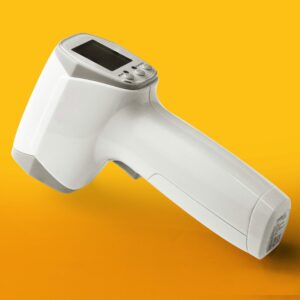
Operating Instructions:
- Hold thermometer trigger until you hear a beep
- Release Trigger
- Listen for the words “Connected to thermometer
- Then follow the instructions to point thermometer toward your forehead holding it approximately one inch away and old the trigger for two seconds
- You will hear the thermometer make two clicking sounds while it is pressed. Release the trigger after two seconds
- After you have completed your reading, you will hear, “Your device will power off in approximately two minutes. Please do not take any measurements during this time.
The entire process with the touchless thermometer takes approximately Fifty-seven seconds.
Are No Contact Thermometers Accurate?
No contact thermometers came into their own during the Ebola Virus outbreak in 2014. These thermometers proved extremely beneficial in helping to mitigate spread throughout Nigeria as well as other places around the world. In their 2014 article from the middle of the fight, NPR Public Media explained: “The hand-held, no-touch thermometer seems to have emerged as the most popular for Ebola screenings, doctors say because it’s fast, easy to use, noninvasive, pretty accurate, relatively inexpensive, and minimizes the chance of spreading illness.”
During the pandemic of 2020, due to an outbreak of COVID19, no contact thermometers became the rule instead of the exception. In their article addressing how employers could safely conduct temperature screenings on their employees in the workplace, Ogletree Deakins recommended “Consider regular health checks (e.g., temperature and respiratory symptom screening) of students, staff, and visitors entering buildings (if feasible),” or guidance from local public health authorities. In that article they included recommendations from the State of Ohio; “It is best to use touchless thermometers (forehead/temporal artery thermometers) if possible, but if you must use oral or other types of thermometers, make sure to clean the thermometers thoroughly between each employee, as to not spread infection.”
In conclusion, no-contact thermometers have proven, through two serious health events, to be an accurate, quick, user-friendly measuring tool in monitoring human body temperatures. And our Pro Health makes it simple to learn how to take vitals at home. This tool is a significant first step.
Blood Pressure Documentation
If you or someone you know has ever experienced a heart event, you know one of the foundational activities to recovery is monitoring blood pressure. Systolic and diastolic (the numbers recorded) actually indicate how your heart is taking in and squeezing out the blood it pumps. Systolic or the top number in the readings is when your heart squeezes that blood out of your heart through your arteries taking oxygen to the rest of your body. Diastolic or the number on the bottom of the reading indicates the pressure in your arteries when your heart is taking a break between beats. This is when it fills with blood and life-giving oxygen.
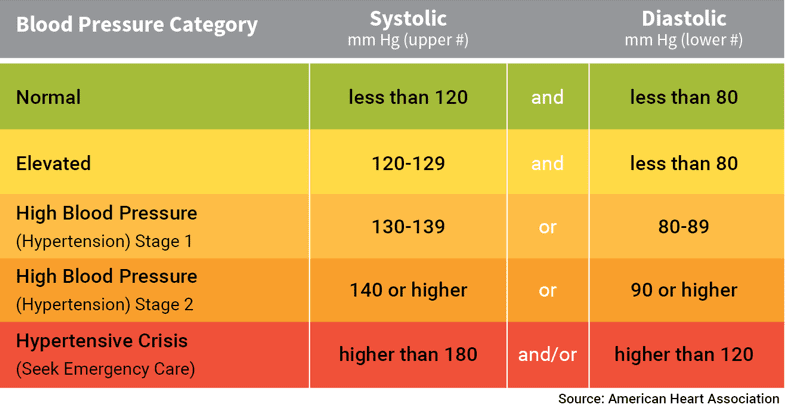
WebMD published an easy to digest article concerning the essential facts to know about blood pressure. In it, they state, “Keeping track of blood pressure at home is important for many people, especially if you have high blood pressure. This helps you and your doctor find out if your treatment is working.”
In the article, they also offer some practical points on the best cuffs to use, what to do when taking your pressure, as well as some don’ts that can adversely affect your results. And also, they break down the numbers so a person can tell where on the health curve they are currently. Daily home monitoring only serves to assist you and your health care professionals in charting a safer, healthier course of treatment and hopefully recovery. Electronic Caregiver simplified the process to check vitals at home, including the blood pressure monitor.
The Blood Pressure Monitor
Check out these easy-to-understand instructions for the blood pressure blue tooth peripheral.

The BP Monitor includes the following features:
- Track your Systolic and Diastolic Blood Pressure
- Pulse Date and Exact Time are recorded within the RemoteCare 24/7 App
- Irregular Heartbeat Indicator
- Available in Small Medium and Large cuff sizes
- One-Touch Operation
- BP Mode & Clock Mode
- 4 User/396 Total Storage Memory
- 4 Alarm Clock Settings
- 5 Mode Average Function – Hour, Day Week, Month, Overall
Auto-Power Off Saving Feature - Powered by 4 AA Batteries
Fifty Seconds to Record Your Pressure
Remove right-fitting clothing from your upper arm and thick clothing. Pull on the end of the cuff until it wraps securely around your upper arm. Place your arm on a table so that the cuff will be at the same level as your heart. Press the power button on the device. The cuff will automatically inflate, and the measurement will start. You will hear these words: “Connected to blood pressure monitor. Please ensure the inflation hose is centered within the bend of your elbow. Please wait.”
When the measurement is complete, the cuff will automatically deflate. The systolic and diastolic pressure values and pulse rate will be displayed on the monitor. The ProHealth console will announce the vital reading over its speaker. At the end of the reading, you will hear, “Thank you for taking blood pressure reading. It is now time to power off your B/P monitor by pressing the blue button.” And it is as simple as that. It takes approximately 50 seconds to obtain a reading once the cuff is in place on your arm, and you push the blue power button. What about that process could your heart not love?
Beam up those oxygen levels!
As crucial as that ole ticker is, it won’t function correctly without the amount of oxygen it needs. And neither will the rest of you. So if your heart isn’t oxygenated, it won’t work to oxygenate the rest of your body and vice versa. Needless to say, the levels of oxygen in your body are kind of a big deal. But measuring that information doesn’t have to be at all.
To measure the levels of oxygen in the human body, the medical community uses a pulse oximeter. Medicine.net shared this in-depth look at pulse oximetry. They shared what it is, what it’s about, and why it’s essential. Did you know that a beam of red and infrared light passes through your blood, and that’s what measures how much oxygen your blood has in it at that moment?
One of the best results about pulse oximetry is that your doctor can get a good idea of how much oxygen your body receives in various parts and limbs. This analytic tool is used to monitor the levels that affect a myriad of diagnoses and chronic conditions. It’s used for so many reasons, including how well a new drug is working. It can help to determine if you need extra oxygen on a regular or sporadic basis. It can indicate if you stop breathing while you are sleeping. Most significantly, it hep to determine if a ventilator is helping sufficiently.
The Pulse-Ox to Check Vitals at Home
Here are the simple, easy-to-understand directions for the pulse oximeter that can be part of your customized Pro Health System. Read for yourself how simple this peripheral is to use:
The pulse oximeter provides sets of information:
- SpO2 (Peripheral Capillary Oxygen Saturation)
- Pulse Rate
- Perfusion Index (Measuring the strength of your blood flow to your extremities,
- i.e., fingertip)
The Oximeter is Operated by 2 “AAA” batteries.
Easy Does It

Place the pointer finger completely into the rubber pad cavity of the Oximeter, keep the fingernail surface upward, and release the clip. Then press the power key to power on the Oximeter. (If you do not yet completely insert your finger into the cavity, the measurement result may be inaccurate.) You will hear the words, “Connected to pulse ox. This process will take approximately 30 seconds. Please make sure the display on your meter is on the top of your finger. Breathe normally, and minimize hand movement.” After the readings become stable, read the measured values of oxygen saturation and the pulse rate on the screen. The Pro-Health system should also repeat the readings from the screen.
When the test is completed, you will hear the words; “Thank you for taking your pulse ox reading. Please remove it from your finger. Your device will power off automatically.” The Oximeter automatically powers off 10 seconds after the finger leaves the Pulse Oximeter.
Amazingly, something so simple and so small can give your doctor so much information. And, the fact that you can check vitals at home makes that even better.
Wait, all this and Telehealth too?
We would be totally remiss if we didn’t tell you that your Pro Health System also includes pocketMD telehealth services. So if you are not feeling great today, and you check some measurements and they seem off to you, you can chat about that. If you don’t really want to make the drive to urgent care, you can still talk to someone. If you are not in the mood to wait in the ER for hours, make one call first to see if you need to do that at all.
PocketMD is a 24/7 telehealth solution that comes with most packages and can be added on to any system. PocketMD provides instant access to physicians on demand for all our Electronic Caregiver clients. It is fast, convenient, and you and up to seven dependents can use it for unlimited, 24/7 consultations.
PocketMD physicians can send prescriptions to any pharmacy in the nation. PocketMD helps clients avoid late-night trips to the emergency room or urgent care full of other ill people.
We have partnered with a leading telehealth provider servicing millions of patients nationwide. These physicians have an average 15-20 year practice experience from geriatric care to pediatrics. They have completed over 120 modules of certification. All of them are thoroughly vetted for licensing and malpractice before being approved. How helpful will it be when you tell them you check vitals at home?
Check Vitals at Home
Yes, in today’s COVID19 world, our awareness and diligence to know more about our own health is on the uptick. We think that is a good thing. We also know that keeping oneself safe, keeping our families and communities safe is integral. It’s why so many people are now purchasing the Electronic Caregiver Pro Health system. And it’s one of the reasons we were so diligent in including the most widely used vital sign measuring tools in healthcare. Multiple diagnosis possibilities are why we made the system to be customizable. Because to check vitals at home should be simple, quick, and, most of all, accurate. That way, we are all empowered to live life a little healthier every day. Measure often and stay well.